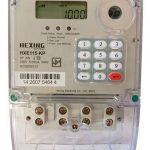
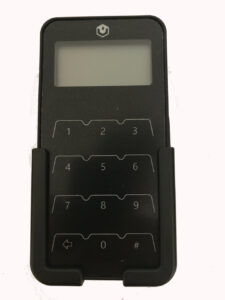
If you are a KRN 1 then worry, If you are a KRN 2 then you are good.
By 24 November 2024 ALL prepaid meters in South Africa will need to be recoded.
The current Token Identifier (TID) code will expire on 24 November 2024 and after this date all Standard Transfer Specification (STS) compliant meters will stop accepting credit tokens. Most meters in the country fall within this category. This project is known as the Key Revision Number (KRN) rollover project.
See: What is KRN and Why Should You Care? for more info.
This project is a customer DIY rollover. As a prepaid meter user, you will be guided on how to recode your own meter. It is very easy. Just follow three steps, and you are done!
Your two key change tokens will be issued when you purchase electricity when your area is active.
You will need to follow these steps:
- Enter the first of the 20-digit codes into the system and wait for it to be accepted.
- After the code has been accepted, the second 20-digit code must be entered.
- A third code – which is the top-up token – can then be entered. Customers will know the system has been successfully updated when the top-up token is successfully loaded.
Some customers will have done this ages ago, some properties and prepaid meters will have new owners and many are now asking HOW they will see whether their prepaid meters have been recoded or not.
In order to see if your prepaid meter is recoded and will work after 24 November 2024 see below:
- When next you purchase electricity examine the slip given to you with your TID Code
- Towards the bottom of your slip you will see a reference to KRN
- If the number after/below KRN is 1 then your meter has NOT been upgraded yet
- If the number after/below KRN is 2 then your meter HAS been upgraded.

Alternative Method:
According to Councillor Angus McKenzie you punch the following code into your prepaid meter: 1844 6744 0738 4377 2416 – push Enter.
If the display shows; “rEu 2” then you have upgraded and if it says 1, then you need to upgrade.
Link to his video: https://www.facebook.com/reel/573388385074223
UPDATE: If you do the above on a Landis+Gyr prepaid meter and get this response – 1.2 – instead of just a 1 or a 2 it means that your meter is still on KRN1 and still needs to be updated.
Eskom Provided This Information:
To check if your prepaid meter has been recoded to KRN 2, enter 1844 6744 0738 4377 2416 on your meter.
Should the above number not work please punch in the unique numbers below according to the make of your meter:
- L&G (E4560) – i057 enter
- L&G (PLC2) – i057
- Conlog – #005#
- Voltex – 005 enter
- Nyamaleza – Press red and hold until display dots, then type 005 enter
If the meter displays 2 this means that the meter has been recoded.
If the meter displays 1 then consumers need to update their details through Alfred the Eskom Chatbot at https://alfred.eskom.co.za/chatroom by selecting ‘Update My Details’ and completing the fields displayed.